> ## Documentation Index
> Fetch the complete documentation index at: https://docs.parchmenthealth.io/llms.txt
> Use this file to discover all available pages before exploring further.
# Embedded iFrame Integration
> Guide for embedding Parchment Portal directly into your application using an iframe
## Prerequisites
* Valid partner credentials (partner\_id, partner\_secret, organization\_id, organization\_secret)
* **Parchment SSO Integration**: You must first set up [Parchment SSO](/sso/sso-integration-generic) before implementing iframe embedding
* Your domain needs to be **whitelisted** in Parchment's environments
## Implementation Steps
### 1. Generate SSO Token with Embed Path
When generating an SSO token for iframe embedding, use the `/embed/` prefix in your redirect path:
> 🚀 **API Endpoint**
>
> ```
> POST /v1/sso
> ```
**Headers:**
* `x-partner-id`: Your partner ID
* `x-partner-secret`: Your partner secret
* `x-organization-id`: Target organization ID
* `x-organization-secret`: Organization secret
* `x-user-id`: Parchment user ID to authenticate
* `Content-Type`: application/json
**Request Body:**
```json theme={null}
{
"redirect_path": "/embed/patients/f03b972b-53ea-452d-ae48-024817f6c3b0/prescriptions"
}
```
**Important:** The `/embed/` prefix in the redirect\_path tells Parchment to render the page in iframe-optimized mode, removing navigation elements and adjusting the layout for embedded display.
### Available Embed Paths
| Path | Description |
| -------------------------------------------------------------- | ------------------------------------------------------------------------------------------ |
| `/embed/patients/{patient_id}/prescriptions` | Prescription form for a specific patient. Main entry point for creating new prescriptions. |
| `/embed/patients/{patient_id}/prescriptions/{prescription_id}` | View or manage an existing prescription for a patient. |
| `/embed/prescriptions/approval` | Approval dashboard for reviewing, approving, amending, or rejecting queued prescriptions. |
**Response:**
```json theme={null}
{
"success": true,
"data": {
"sso_token": "eyJ...",
"redirect_url": "https://portal.parchment.health/auth/sso?token=eyJ...&redirect=%2Fembed%2Fpatients%2F...",
"expires_in": 300
}
}
```
### Query Parameters
The prescription form (`/embed/patients/{patient_id}/prescriptions`) accepts query parameters to **pre-fill** fields and to **pass partner data through to webhooks**. Append them to the `redirect_path` when generating the SSO token — they are preserved through the SSO redirect onto the embedded page:
```json theme={null}
{
"redirect_path": "/embed/patients/f03b972b-53ea-452d-ae48-024817f6c3b0/prescriptions?custom_drug_id=DRUG%2342&quantity=2&reserved_1=ORDER-9087"
}
```
URL-encode all values (e.g. a space becomes `%20`, `#` becomes `%23`).
#### Pre-fill parameters
| Parameter | Type | Constraints | Description |
| ---------------------- | ------- | ----------- | ---------------------------------------------------------------------- |
| `custom_drug_id` | string | non-empty | Selects a custom drug from the organization catalog as the medication. |
| `quantity` | integer | 1–199 | Quantity to dispense. Must be a whole number. |
| `repeats` | integer | 0–99 | Number of repeats. |
| `repeats_interval` | integer | 1–365 | Minimum interval (days) between repeats. |
| `patient_instructions` | string | ≤ 250 chars | Directions for the patient. Longer values are truncated. |
| `doctor_instructions` | string | ≤ 50 chars | Note for the dispenser. Longer values are truncated. |
Invalid numeric values are ignored (a warning is shown in the form); over-length text is truncated.
#### Reserved parameters
Opaque pass-through values for partner use. They are shown **read-only** on the form and delivered on the resulting webhook in the top-level `metadata` object (see [Webhook Events](/webhooks/webhook-events)).
| Parameter | Type | Constraints | Description |
| ------------ | ------ | ----------- | --------------------------------------------------- |
| `reserved_1` | string | ≤ 30 chars | Reserved partner data. Longer values are truncated. |
| `reserved_2` | string | ≤ 30 chars | Reserved partner data. Longer values are truncated. |
| `reserved_3` | string | ≤ 30 chars | Reserved partner data. Longer values are truncated. |
Each reserved field is independent of the pre-fill precedence above. A field only appears on the form (and is forwarded to the webhook) when it is present and non-empty; absent fields are delivered as `null`.
**Example**
A telehealth partner wants to tie the resulting prescription webhook back to their own records — the booking it came from, the consultation, and the acquisition channel. They pass those as reserved fields when generating the SSO token:
```json theme={null}
{
"redirect_path": "/embed/patients/f03b972b-53ea-452d-ae48-024817f6c3b0/prescriptions?reserved_1=BK-2026-4471&reserved_2=consult_88213&reserved_3=app-ios"
}
```
When the clinician creates the prescription, Parchment echoes those exact values on the webhook's `metadata`, so the partner can reconcile the event against their booking system without any extra lookup:
```json theme={null}
{
"event_type": "prescription.created",
"data": {
"patient_id": "f03b972b-53ea-452d-ae48-024817f6c3b0",
"partner_patient_id": "1523402100149593750",
"user_id": "8e1c9bab-6614-4723-8981-87c8fa026dae",
"scid": "2TM1XVXBJRWXH8NM68"
},
"metadata": {
"reserved_1": "BK-2026-4471",
"reserved_2": "consult_88213",
"reserved_3": "app-ios"
}
}
```
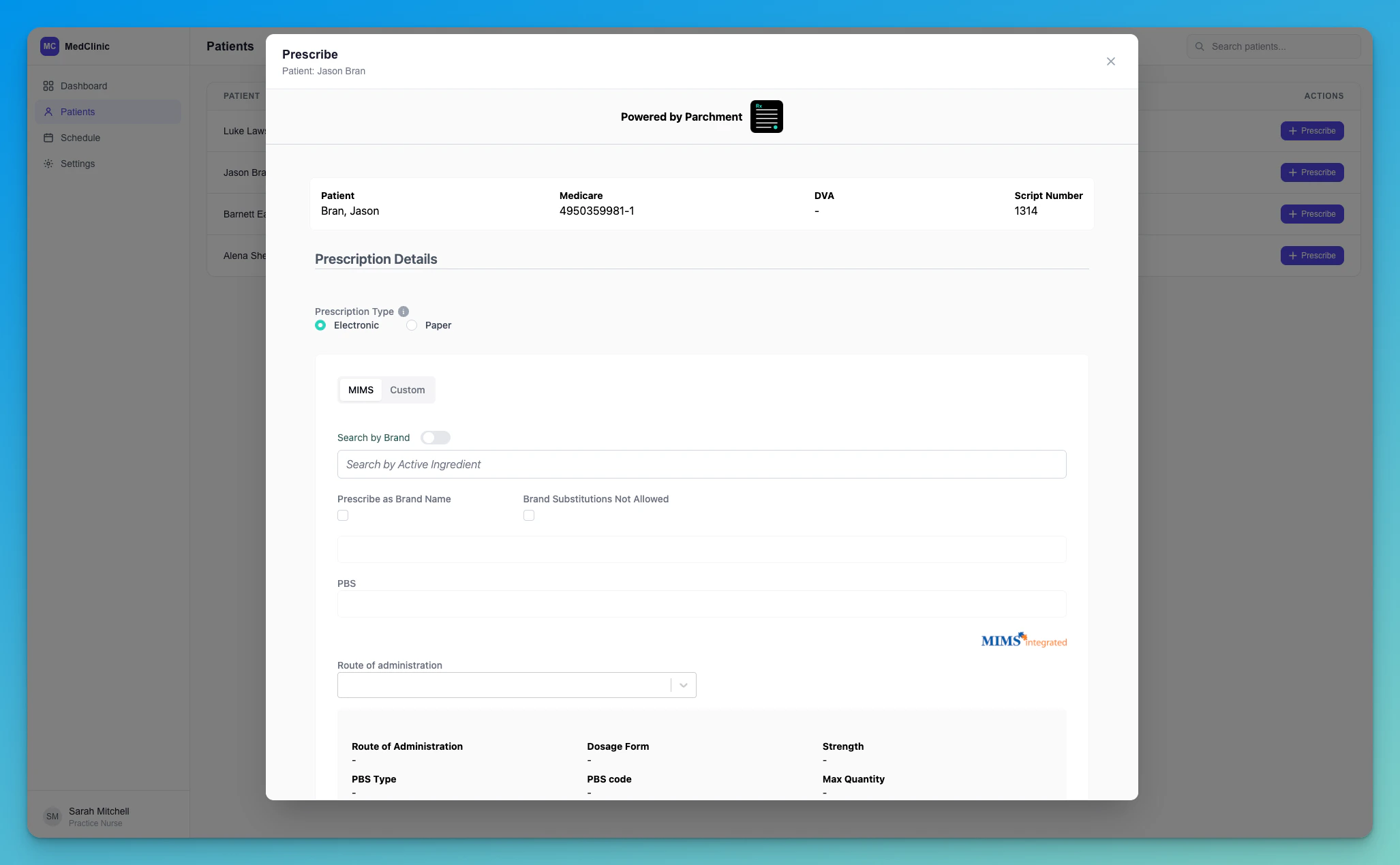
### 2. Embed in Your Application
Use the returned `redirect_url` as the iframe source:
```jsx theme={null}
```
### Result
 ## Troubleshooting
### Blank page with "HTTP ERROR 431"
If the embedded iframe (or the portal itself) shows a blank page reading
**`HTTP ERROR 431` — Request Header Fields Too Large**, the browser has
accumulated too many Parchment authentication cookies on the
`parchment.health` domain and the request header has grown past the
server's size limit.
This almost always happens during **integration testing**, when the same
browser signs in many times in a short period — each sign-in can leave
behind cookies that aren't cleaned up. End-users who sign in occasionally
are very unlikely to see it.
This is a browser-side cookie limit, and the error is returned *before* the
page loads — so refreshing or navigating to another Parchment URL won't fix
it. The cookies have to be cleared.
Open **DevTools → Application → Cookies**, then select the
`https://portal..parchment.health` entry.
Click **Clear all cookies** (🚫) to remove every cookie for that domain —
in particular the `CognitoIdentityServiceProvider.*` entries.
Generate a fresh SSO token and load the iframe again. You'll sign in
cleanly and the error will be gone.
To avoid this entirely while testing, use an **incognito/private window**
(or a separate browser profile) for each round of sign-in testing — its
cookies are discarded when the window closes.
## Troubleshooting
### Blank page with "HTTP ERROR 431"
If the embedded iframe (or the portal itself) shows a blank page reading
**`HTTP ERROR 431` — Request Header Fields Too Large**, the browser has
accumulated too many Parchment authentication cookies on the
`parchment.health` domain and the request header has grown past the
server's size limit.
This almost always happens during **integration testing**, when the same
browser signs in many times in a short period — each sign-in can leave
behind cookies that aren't cleaned up. End-users who sign in occasionally
are very unlikely to see it.
This is a browser-side cookie limit, and the error is returned *before* the
page loads — so refreshing or navigating to another Parchment URL won't fix
it. The cookies have to be cleared.
Open **DevTools → Application → Cookies**, then select the
`https://portal..parchment.health` entry.
Click **Clear all cookies** (🚫) to remove every cookie for that domain —
in particular the `CognitoIdentityServiceProvider.*` entries.
Generate a fresh SSO token and load the iframe again. You'll sign in
cleanly and the error will be gone.
To avoid this entirely while testing, use an **incognito/private window**
(or a separate browser profile) for each round of sign-in testing — its
cookies are discarded when the window closes.